> For the complete documentation index, see [llms.txt](https://docs.faspay.co.id/llms.txt). Markdown versions of documentation pages are available by appending `.md` to page URLs; this page is available as [Markdown](https://docs.faspay.co.id/getting-started/faspay-billing-2.0/how-to-use/qr-business-profile/access-order-list.md).
# Access Order List
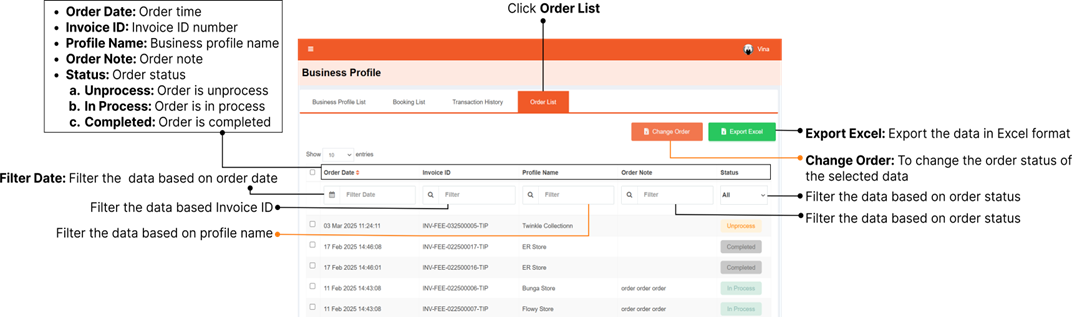
If you activated order feature on QR Business Profile page, you can access the order list of your customer through Faspay Billing → Busines Profile, click Order List.
### Update Order Status
You can update the order status through **Faspay Billing → Business Profile → Order List.**
#### Update Order Status from Unprocessed to In Process
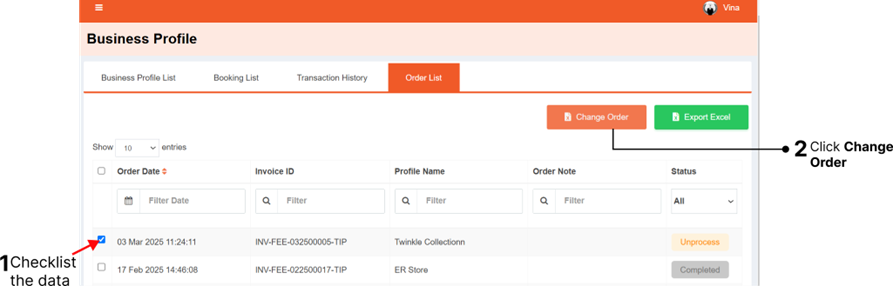
1. Select the order(s) that you want to update**.**
{% hint style="info" %}
You can select more than one order at a time.
{% endhint %}
2. Click **Change Order.**
{% hint style="warning" %}
Orders with Completed status cannot be updated.
{% endhint %}
3. Click **Yes**, to confirm the order status update.
4. The order status will be updated to **In Process.**
#### **Update Order Status from In Process to Completed**
1. Select the order(s) that you want to update.
{% hint style="info" %}
You can select more than one order at a time.
{% endhint %}
2. Click **Change Order.**
{% hint style="warning" %}
Orders with Completed status cannot be updated.
{% endhint %}
3. Click **Yes**, to confirm the order status update.
4. The order status will be updated to **Completed.**
### **Export Order List**
You can Export your order list through **Faspay Billing → Busines Profile → Order List,** click
\
**Export Excel.**
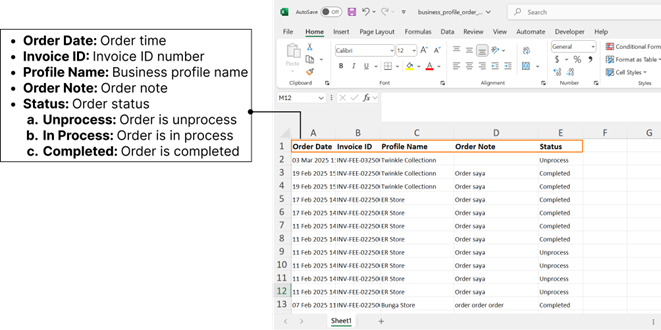
Here’s the order list in excel format.
{% hint style="info" %}
Notes :
* File will be exported in format order\_list\_ddmmyyyy-ddmmyyyy.xlsx.
* All the order list will be included in the exported file, except you are using some data filters, so it will be based on the data filters, that are being used.
{% endhint %}
.png?alt=media&token=d0dc95e1-fdd4-4b2b-85a0-f8323df2c201)
.png?alt=media&token=1b3cf9b3-c529-4bfe-9f05-91672c70f44e)
.png?alt=media&token=4074efdb-cc5f-490f-80a8-ae83f8325785)
.png?alt=media&token=65ded5f3-93ed-4a27-9dc9-f5a9d833c4d7)
.png?alt=media&token=05bfc048-a064-4a3e-91c5-b176e55ddbd6)
.png?alt=media&token=37b58a9c-984c-455b-9c04-cee5fbf61764)
.png?alt=media&token=534b8e7b-ab51-454e-9caf-bd1f9931ad3f)
.png?alt=media&token=4cf7605b-2d9c-4e27-acd9-fe223fa60061)